
SwingScan Pro for TradingView
Know where to buy and where to sell on any Indian or US stock
SwingScan Pro marks buy and sell ideas right on your TradingView chart: add to a stock at every Buy, then exit the whole position at the Sell. It works on every NSE, BSE, NYSE and NASDAQ stock available in TradingView.
Price and access are shared on WhatsApp. Educational tool, not investment advice. BCB Elevate is not SEBI-registered. Trading involves risk of loss. Read the disclaimer
- NSEIndia
- BSEIndia
- NYSEUnited States
- NASDAQUnited States
- 1DDaily timeframe
On a real chart: Federal Bank, NSE, daily
SwingScan Pro on the Federal Bank daily chart in TradingView, with the capital estimate turned on. Each Buy shows the shares to buy, and each Exit all shows how the cycle ended.
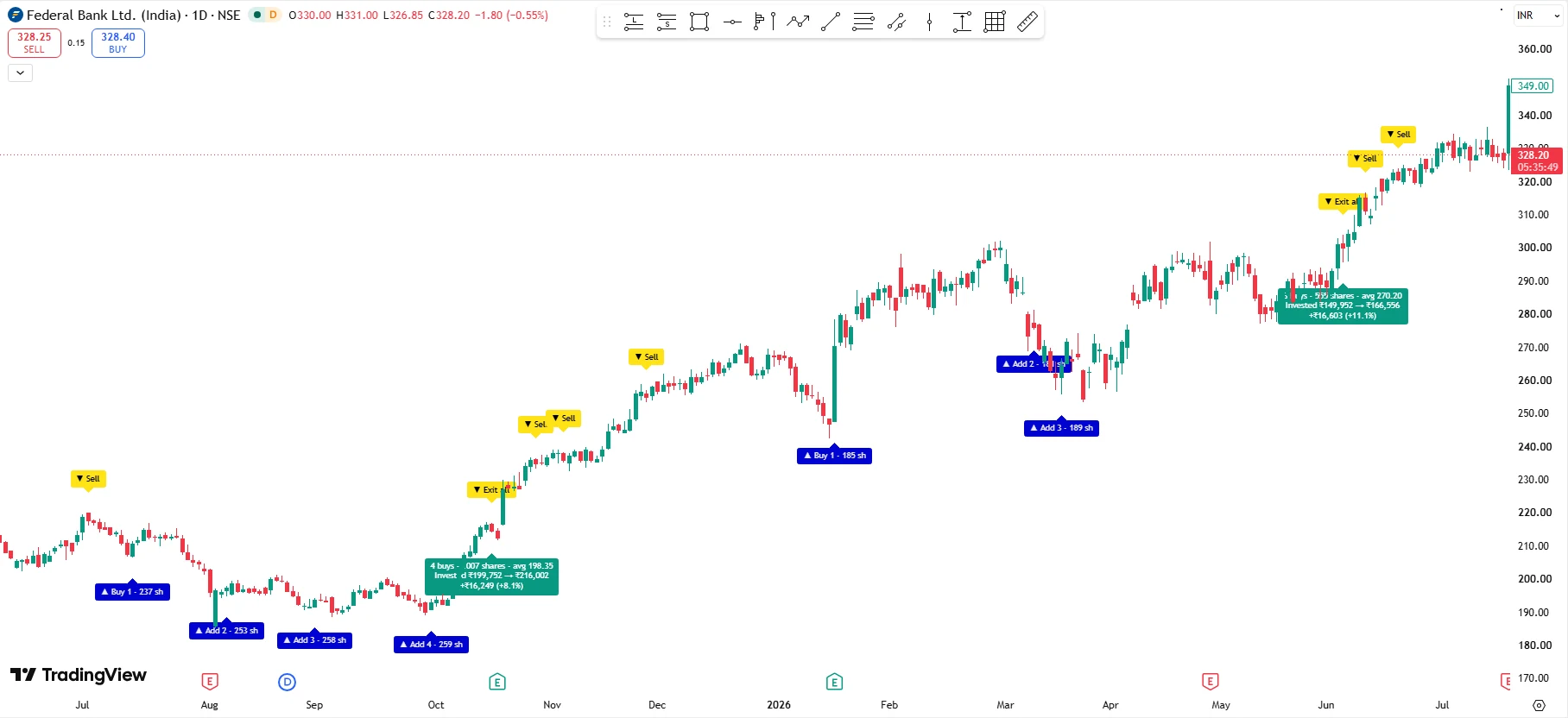
- Buy 1 starts a cycle
The first Buy of a cycle, with the shares your capital buys at that price.
- Add on the dips
Add 2, Add 3 and Add 4 build the position in stages as the stock pulls back.
- Exit all
One Exit all label closes the whole position built from the earlier Buys.
- Cycle summary
Shares, average cost, money invested and returned, and the profit or loss for the cycle.
What appears on your chart
Each cycle reads like a plan: Buy 1 starts a position, Add 2 and Add 3 build it on dips, and Exit all takes the whole position off.
- ▲ Buy 1Start a position
- The first blue label in a cycle appears when a pullback shows signs of turning back up.
- ▼ Exit allExit the whole position
- A yellow Exit all label appears when a rally shows signs of running out of steam.
- ▲ Add 2Add on every dip
- Each further dip before the exit is numbered Add 2, Add 3 and so on, so you build the position in stages instead of all at once.
- +%Cycle summary at every exit
- When Exit all appears, a tag shows how many buys you made, the shares and average cost, the money invested and returned, and the profit or loss.
- 47 shShares from your capital
- Type your capital in the settings: split it across a set number of buys, or use a fixed amount at every buy. Each Buy then shows how many shares to buy, and the summary shows the estimated profit or loss in money. Estimates exclude brokerage, taxes and slippage.
- Alerts on your phone
- With a paid TradingView plan such as Premium, set an alert once and TradingView notifies you when a buy or sell signal fires.
- Any stock in TradingView
- Indian and US stocks, indices and ETFs, plus forex and crypto charts.
- Lifetime updates
- Every future improvement to SwingScan Pro is included at no extra cost.
How to get SwingScan Pro
Message us on WhatsApp
Say hi on WhatsApp. We answer your questions and share the price.
Share your TradingView username
We add SwingScan Pro to your TradingView account as an invite-only indicator.
Add it to your chart
Open any stock, add SwingScan Pro from Indicators, then Invite-only scripts, and set your alerts.
Is it right for you?
A good fit if you
- Swing trade Indian or US stocks and hold for days to weeks
- Want clear entry and exit ideas without watching charts all day
- Like to build a position in stages on dips and sell it in one go
- Already use TradingView, or are happy to start
Know the limits
- No indicator is right every time. A stock can keep falling after a Buy.
- Buying more on dips without a stop-loss can increase your losses. Set your own position size and limits.
- It is tuned for daily charts, not for scalping or intraday trading.
- It marks signals on the chart you open; it does not pick stocks for you.
- It supports your analysis and risk management; it does not replace them.
Questions traders ask
Does SwingScan Pro work on Indian stocks?
Yes. It works on NSE and BSE stocks available in TradingView, and on Indian indices and ETFs.
Does it work on US stocks?
Yes. It works on NYSE and NASDAQ stocks, US indices and ETFs, and any other chart TradingView shows, including forex and crypto.
Which timeframe should I use?
SwingScan Pro is built for the daily chart, which suits swing trades that last from a few days to a few weeks. It runs on other timeframes, but the daily chart is where it is tuned.
Do I need a paid TradingView plan?
No. The indicator works on a free TradingView account. To get buy and sell alerts on your phone, you need a paid TradingView plan that supports indicator alerts, such as Premium.
How do investors use the Buy and Sell labels?
Buy 1 starts a position. Each further dip is labelled Add 2, Add 3 and so on, so you build the position in stages. Exit all marks where to sell the whole position, with a summary tag showing how many buys were accumulated, their average price and the % change.
Does SwingScan Pro give a stop-loss?
No. It is built for accumulating on dips and selling the whole position at the Sell, so it does not mark a stop-loss. Decide your own position size and the most you are willing to lose on each stock before you start.
Does it repaint?
Signals are confirmed when the daily candle closes. While today's candle is still forming, a label can appear and disappear as price moves. Once the candle closes, the label stays on the chart.
Can it scan many stocks at once?
On its own, SwingScan Pro marks signals on the chart you open. Some paid TradingView plans include the Pine Screener, which can run indicators across a watchlist; check TradingView's plan details.
How do I get SwingScan Pro and what does it cost?
Message us on WhatsApp at +91 88480 63402. We answer your questions, share the price and then add the indicator to your TradingView account.
Is this investment advice?
No. SwingScan Pro is an educational technical analysis tool. Its labels are not recommendations to buy or sell any security, and you remain responsible for your own trading decisions.
See SwingScan Pro on your own stocks
Message us on WhatsApp for the price and access. We reply with everything you need to get started.
Disclaimer
SwingScan Pro is a technical analysis indicator provided for educational purposes only. BCB Elevate Trading is not registered with SEBI or any other regulator as an investment adviser or research analyst, and nothing on this page or in the indicator is investment advice or a recommendation to buy, sell or hold any security.
Buy and sell labels and cycle summaries are generated automatically from price data and can be wrong. Adding to a position at every Buy without a stop-loss can increase losses if a stock keeps falling. Past signals do not guarantee future results. Trading stocks involves risk, including the loss of your capital. Make your own decisions, trade only with money you can afford to lose, and consult a SEBI-registered investment adviser before investing. Read our full risk disclosure.
TradingView is a trademark of TradingView, Inc. SwingScan Pro is an independent product and is not affiliated with TradingView, NSE, BSE, NYSE or NASDAQ.